Showing posts with label PC Tips. Show all posts
Showing posts with label PC Tips. Show all posts
Wednesday, 25 September 2013

Using Task Manager to Speedup your PC | Find and minimize programs that slow down your Computer
Windows Task Manager is a very useful tool in troubleshooting the programs that we use every day.
Why Do PC's Crash | Most Common Causes of PC Crashes and Slow Downs
The reasons for these problems:
Viruses are the most common reasons why computers crash or slow down.Often the first sign of a virus infection is instability. Some viruses erase the boot sector of a hard drive, making it impossible to start.
Create a Shortcut to lock your Computer
Have you ever left your PC in a hurry? Have you ever felt that it is a pain to lock your system in the simple way of doing CTRL+ALT+DEL? I would imagine that you have and then, this trick is for you.
Change Facebook Theme, Color & Appearance
Facebook is a social networking site which enables people to connect with friends and people around. That's how Facebook is usually introduced. However, Facebook is beyond the need of being introduced as almost everyone is on it. Despite its popularity, Facebook has one flaw; the default blue theme is really boring.
Some even consider it an annoyance while visiting Facebook. As Facebook does not allow users to change its theme like MySpace used to, users are left with no other option but to bear the theme Facebook wants them to use.
However, it is relatively easy to change the Facebook theme to a stylish one using an addon and custom themes which are available free of cost on the internet.
An example of the final outcome would be something like in the image.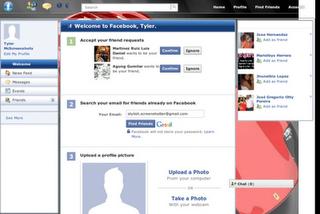
Requirement: The basic requirement for this to work is to have Mozilla Firefox or Google Chrome as your browser.
Steps to achieve this: If you use Google Chrome, click here.
Mozilla Firefox users should carry out the following steps to successfully change Facebook theme.
Open Mozilla Firefox and install 'Stylish' add-on.Follow the basic steps to install the add-on.Restart Firefox after successfully installing the Stylish add-on.Login to your Facebook Account and click on the small 'S' button in your Firefox status bar.Click on "Find Styles for this Site" to open a new tab with free themes to use for Facebook.Click on any theme and a preview will be shown.If everything is fine in the previewed theme, click on "Install with Stylish" button at the top right corner of the page.A dialog box will open.Click on Install in the dialog box.
Steps for Google ChromeInstall Stylish for Chrome from the Chrome Web Store.Navigate to Facebook.com and click on the S button.Click on "Find Styles for this Site" to open a new tab with free themes to use for Facebook.Click on any theme and a preview will be shown.If everything is fine in the previewed theme, click on "Install with Stylish" button at the top right corner of the page
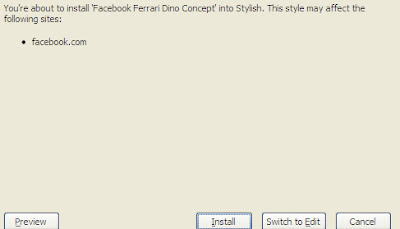
Now whenever you open Facebook, it will show the theme that you have installed with Stylish instead of the boring old blue theme.
Lock a Folder With Password Using Free Folder Protector
All of us have some files and folders that we consider private. They can be anything from our business documents to pictures of friends and family.
Monday, 23 September 2013
Windows 8 tips: master the interface
Use the app bar
Windows 8 apps aim to be simpler than old-style Windows applets, which means it's goodbye to menus, complex toolbars and many interface standards.
Windows 8 tips: new options and features
Tweak SmartScreen
Windows 8 now uses Internet Explorer's SmartScreen system-wide, checking downloaded files to ensure they're safe.
Windows 8 tips: increase productivity
Disable the lock screen
If you like your PC to boot just as fast as possible then the new Windows 8 lock screen may not appeal. Don't worry, though, if you'd like to ditch this then it only takes a moment.
Windows 8 tips: Explorer tricks
Customize the Quick Access toolbar
Windows Explorer in Windows 8 features a Quick Access toolbar immediately above the menu,
How to Change the Start Screen Background in Windows 8
Windows 8’s new Start screen has been hotly debated since the operating system launched in preview mode earlier this year.
HOW TO SECURE YOUR FACEBOOK ACCOUNT FROM HACKING
Facebook Hacking and scams are growing more and more nowadays and many accounts getting hacked everyday, So we have to protect it from hackers and friends who trying to hack our FB account. Making your Facebook account secure is not a difficult thing,
CERTIFICATE ERROR SOLUTION FOR SYMBIAN MOBILES PHONES
Getting “Certificate Error Contact the Application Supplier” every time trying to install softwares and games on symbian smartphones? Than this article is only for you. In this post i will show you easy method to hack your smartphone and install any games or software to your phone. You don’t need pc to do it, You can do it within your mobile.
So, Here’s step by step guide :
Step 1
First of all you have to download 3 apps to start the process. I uploaded it individual so, you don’t need any zip extractor or anything else.
Download 3 apps below one by one to your phone :
Norton Symbian HackRom Patcher PlusY-Browser For SymbianStep 2
Now you have downloaded the 3 apps above, so you need to install “Norton Symbian Hack” to your phone and follow the procedure.
After you installed first app from above list, Launch the application and Go to Options -> Antivirus ->Quarantine list. And you’ll see some files listed there. Then Go To Options -> Restore All. You will ask to confirmation, Click Yes.


 Now, after you restored all Quarantine items,Exit the app and Go to Settings -> App Manager -> Installed apps. And Uninstall Application named “Symantec Symbian Hack“.
Step 3
Now, Install the second application provided above named Rom Patcher. Then Launch the application and you’ll see 2 items listed there.
Now go to Options -> All Patches -> Apply And Then Options -> Add to Auto For Both.
Note : If you’re getting error like Red icon on rompatcher Then Download this file “InstallServers” and read the read-me file and find the appropriate file for your phone and copy the file Installserver.exe to C:/sys/bin. – Only if you getting errors on RomPatcher. 
Step 4
Now we need to delete folder C:/Shared from phone, But the default file manager doesn’t allow us to delete it. So we need another file manager called Y-Browser to delete it. It’s provided in download link above on 1st step. After download install it and Launch Y-Browser and delete the folder C:/Shared from it.
After done all this steps, Restart your mobile, Just for refresh it.That’s All. You can install any application or games to your phone now without any error.
Enjoy And Please Show Your Results In Comments.
HOW TO SET UP PICTURE PASSWORD IN WINDOWS 8
Hello Guys, As You All Already Knows That Windows 8 (Developer Preview And Consumer Preview) Is Launched Some Time Ago, And Is One Of The Best Operating System Ever. Windows 8 Has Many Amazing Features And Picture Password Is Most Amazing Features Of Windows 8.
Here Are Procedure To Set Picture Password For Windows 8 Login.
Sunday, 22 September 2013
Avast Antivirus Pro Serial Keys and License
Today I have uploaded avast antivirus pro serial keys and license
You Have to just download
How To add Read More Link to your blog post.
Why Read More or Continue Reading?
This is very important in order to give some professional look to your blog. From visitors point of view it is also important. For example, suppose you are visiting my blog for first time and my blog doesn't have any "Read More" or "Continue Reading" links and you have no interest on my first post.
so imagine what will happen next, you have to scroll down to the end of the first post to read the second
Download CCleaner Business Edition for free
You can now Download CCleaner Business Edition for free from this blog.
How to Constantly Ping a Website
NOW YOU CAN PING ANY WEBSITE YOU WANT IN JUST THREE SIMPLE STEPS.
1. Open Command Prompt.
Friday, 20 September 2013
Notepad Tricks.
1) Notepad trick to use it as a DiaryOpen notepadType .LOGSave the file as LOG.txtWrite anything in it and it will be saved with the time when you edit it.
2) Notepad trick to Test AntivirusOpen Notepad.Copy the code give below in the notepad file:X5O!P%@AP[4PZX54(P^)7CC)7}$EICAR-STANDARD-ANTIVIRUS-TEST-FILE!$H+H*Save it with an .exe extension like testvirus.exe
3) Matrix Notepad Trick@echo offcolor 2:startecho %random% %random% %random% %random% %random% %random% %random% %random% %random% %random% %random% %random% %random% %random%goto startSave this file as Matrix.batMake sure the file type is kept as ALL FILES while saving it as a .bat file.
4)Notepad Trick to shutdown computer forcefullyOpen Notepad.Paste the following code in it:@echo offmsg * Shutdown computer.shutdown -c “Sleep Tight” -s
Trick to Increase the Internet Speed.
This time I am going to share with you a small PC trick to speedup your internet speed by using this cool pc trick. This PC trick is basically based on the registry setting, which some time makes your internet speed slow, but by using this one cool trick you can speed up. You can perform this pc trick with in a 2 minutes.
For this PC Trick open Notepad and paste the below code in it.
[HKEY_LOCAL_MACHINE\SYSTEM\CurrentControlSet\Servic es\Tcpip\Parameters]
"SackOpts"=dword:00000001
"TcpWindowSize"=dword:0005ae4c
"Tcp1323Opts"=dword:00000003
"DefaultTTL"=dword:00000040
"EnablePMTUBHDetect"=dword:00000000
"EnablePMTUDiscovery"=dword:00000001
"GlobalMaxTcpWindowSize"=dword:0005ae4c
Now save this file name as “ speed.reg ” Now Execute it and observe the change!.
IMPORTANT This article will guide to some steps of modifying your Windows Registry. Stop if you're not familiar with the Windows Registry. Making an inappropriate change to the Windows Registry could cause critical problems to your computer.
Proceed at your own risks
Subscribe to:
Posts (Atom)